This is a very basic overview, of some subjects that seem to cause misunderstandings and elements of confusion for some people.
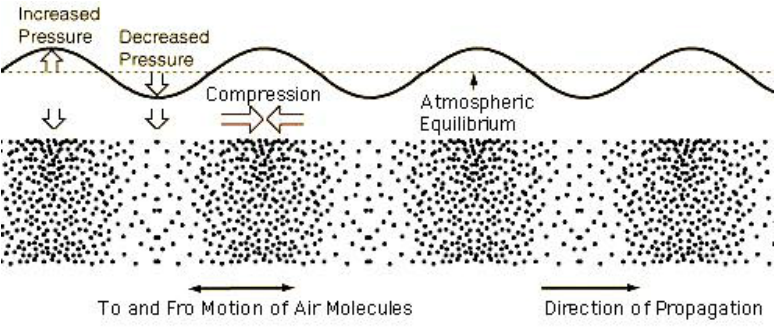
Sound is caused by an object vibrating and causing repeated compression and rarefaction of the air. These pressure waves impact on our eardrums and cause them to vibrate, sending small electrcal impulses to our brain. The same happens with a microphone, a small diaphragm vibrates with the pressure waves and converts the vibration into electrical signals.
Volume, loudness or Amplitude:
The difference between the compression, and the rarefication of the air determines low loudly we percieve the sound. The greater the difference in pressure the louder the sound. Sound level is expressed as dB, the following list is a guide to loudness levels to give an idea of what this means to us;
0 dB – The softest sound a person can hear with normal hearing
10 dB – Normal breathing
20 dB – Leaves rustling, a ticking watch
30 dB – A whisper
40 dB – Refrigerator hum, a quiet office
50 dB – Moderate rainfall
60 dB – Normal conversation, dishwashers
70 dB – Vacuum cleaners, traffic
80 dB – Police car siren, a noisy restaurant- the level at which hearing damage can be caused by prolonged exposure.
90 dB – Hairdryers, blenders, power tools
100 dB – Motorcycles, hand dryers
110 dB – Nightclubs, sporting events
120 dB – Thunder, concerts, a jet plane taking off
130 dB – Jackhammers, ambulances
140 dB – Fireworks, gunshot.
Note: dB as a measurement does not relate in any real sense to voltage or wattage, it is really just a measurement of relative sound or signal levels, it’s really not as simple as saying for example that 100 watts of amplifier power output is equal to 80dB.
Frequency or pitch:
The spacing between the pressure changes determines the pitch, or frequency of the sound we hear. The closer together these pressure changes are the higher the pitch we hear. The human ear can detect these pressure changes when they fall between 20 times per second (20Hz), and 15 000 times per second (15kHz) and the upper limit of audibilty varies between each person. Pitch is the frequency translated into musical terms.
Harmonics:
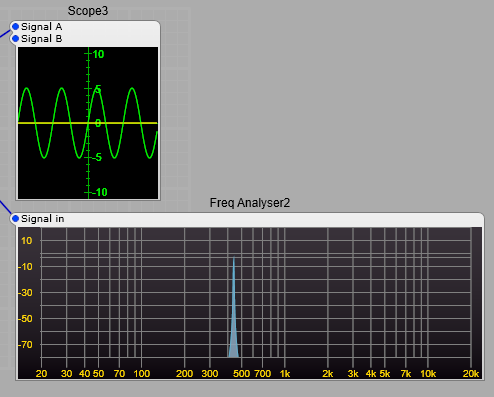
In the image showing pressure waves and how they relate to a sound, we saw a sine wave, this is a pure audio tone of one frequency. There are few (if any, excluding a synthesizer) musical instruments that produce a true sine wave. There will be a fundamental frequency. This is what we hear as the pitch of the instrument, as an example we will use standard A or 440 Hz. Below is our 440Hz sine wave and its frequency spectrum.
We may have an instrument that has a tone made up of the pitch we hear 440Hz, but it has other components. In most instruments such as a flute these will be directly related to our 440Hz pitch. They will be what are called Harmonics, and in most cases they will be at frequecies such as;
440 * 2 = 880 Hz which is the 2nd harmonic,
440 * 3 = 1320 Hz 3rd harmonic,
440 * 4 = 1750 Hz 4th harmonic,
440 * 5 = 2200 Hz 5th harmonic.
For each harmonic we multiply the fundamental frequency by the harmonic number, not the preceeding harmonic.
These harmonics will almost always be at a lower level than the fundamental.
I have used these as an example below with decreasing levels, you can see the effect on the waveform.
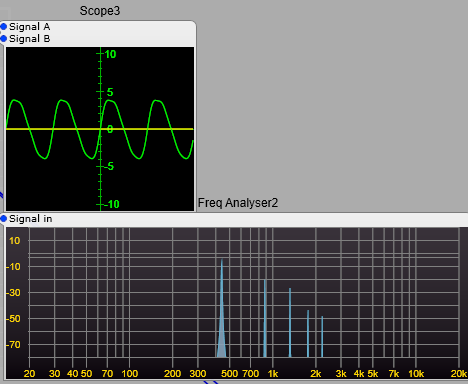
In the example below the 4th harmonic has been increased in level above the 3rd harmonic you can see how this has affected our waveform, this will have noticable changed the timbre of our sound but not the percieved pitch, as this is still the strongest of all the pitches.

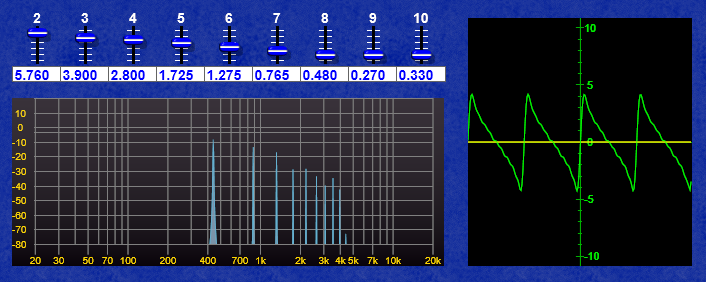
If we go as far as the 10th harmonic, then we can get a rough approximation of a sawtooth, with a bit of juggling with the levels.
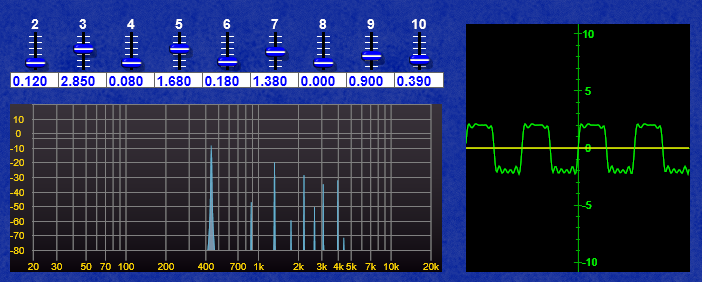
And by some juggling with the odd harmonics (3,5,7, & 9th) keeping the even harmonics low a crude approximation of a square wave.
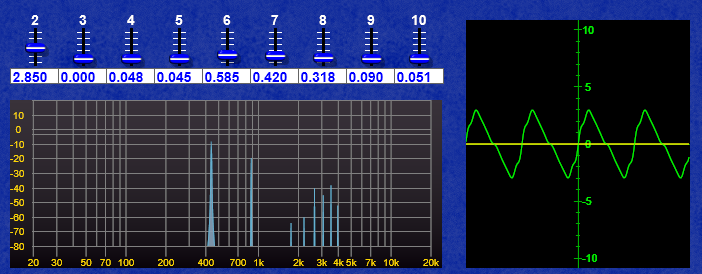
Further juggling with even harmonics (2,4,6,8 & 10th) can get a wonky Triangle shaped wave.
Why are the harmonics so important? Where do they come from in physical instruments?
Why are these harmonics so important? Without getting too technical, and going deep into the theoretical side, musical instruments are usually a resonant string or tube (Very much over-simplified, but close enough). If we take a string and pluck it we will get a strong vibration the pitch of which is defined by the length of the string. However the string will also have other modes of vibration related to it’s length.
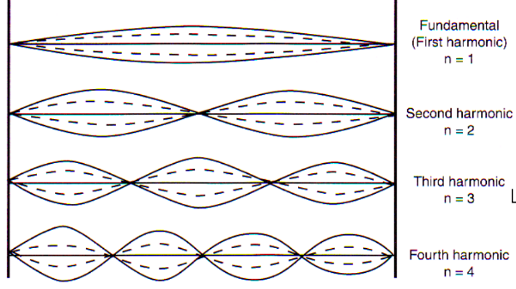
Each of these is added to the fundamental, in decreasing amounts relating to a range of variables such as; string tension, string diameter, the materials in the string, how hard the string is plucked, and what the ends of the string are attached to (Not to mention the shape and size of the body of the instrument etc). The same principle applies to woodwind and brass instruments. The science of acoustic instruments and analysing or predicting the sound they produce needs some complex mathematics.
Where things get strangely different and eye wateringly complex is with percussion instruments…but that’s another very, very complex subject.
The complete science and analysis defining the sound produced by even a very simple physical musical instrument is very complex and requires a lot of complex maths.
What about Phase? What is it?
In the screenshot below we have two sine waves of the same frequency.

See how they both start on the same part of the sine wave’s cycle. These are in phase, there is no time difference between them, and they have a phase difference of 0 degrees.. If you add the two waves together you’ll get another sine wave only twice the amplitude. 5+5 = 10, (-5) + (-5) = -10.
In the screenshot below the two sine waves are out of phase, and have a phase difference of 180 degrees. You can see that the two waves have cancelled each other. (+5) + (-5) =0.
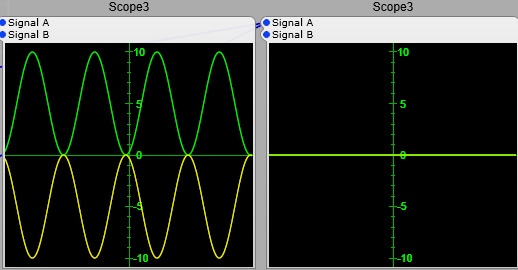
When they are 90 degrees out of phase you get a partial addition of 5 + 2.5 = 7.5, and (-5) + (-2.5) = -7.5.

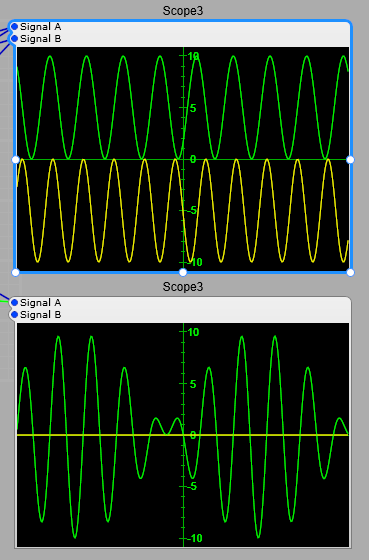
So if the phase between these two sine waves was to vary slightly over time you would get a “beating” effect as the two alternaltely fade between adding and cancelling. This is in effect what is happening when you have two sine waves of slightly different pitches, if the difference between the two sine waves is 0.5 Hz, then you would get a beating effect where the signals would fade between adding and cancelling every two seconds
The importance of phase and phase shift.
These effects caused by phase are very important to us in electronic music production, as phase differences can be used for positioning instruments in the stereo field and introducing changes to the harmonic structure (timbre) of the sounds. The effects apply equally to electronic audio signals and acoustic audio waves that you hear from a loudspeaker.
Note: Phase is not audible as such until we introduce a second audio signal into the mix where it will immediately change the timbre of the audio. If you have a single audio signal and vary its phase, you will not hear any difference, unless you were to take the original audio and mix it with the phase shifted audio, once you do this you’ll get a frequency notch where the two signals subtract from each other (the classic phasing effect). Small variations in frequency however are immediately obvious to most listeners without any second signal to refer to (unless you are totally tone-deaf).
An exception to the rule of phase changes being inaudible.
There is however an exception to phase changes not being audible: if a very deep and rapid change is made to the phase of an oscillator, you will get something called Phase Modulation or Phase Distortion, where this actually distorts the shape of a sine wave. This effect has been used to great effect notably in Casio CZ (Phase Distortion) and Yamaha DX FM synthesizers (strictly speaking this should be PM or Phase Modulation) synthesizers for example…but thats another complex subject. Just as an illustration in the image below the yellow trace is a 440 Hz sine wave with no phase changes, the green trace is a 440 Hz sine wave with a 10% shift in phase being applied by an 880 Hz sine wave.

Phase and audio Mixing.
Phase is also important when it comes to converting a stereo signal to a mono signal. What sounds great in stereo may if there is a phase difference between left and right channels the mono audio will sound totally different, and may have a band of frequencies that are cancelling out boosting some frequencies and cutting others. It can also sound like a comb filter (flanger) being applied without any variation in the flanger delay time. All that careful mixing and equalization is quickly ruined. This could even be outside your control… music heard on a radio may not be heard in stereo for example.
This is where phase shift can become vital in tone control and equalizer plug-ins.