Setting the Ignore PC/Ignore Program Change flag stops controls from responding to Patch Changes. This is useful if you are using pre-programmed patches in a Synthesizer, but want to exclude some controls such as a master volume control from responding to the patch change.

Where are IgnorePC and other parameters stored ?
The IPC parameters are stored in the same place as other plug-in parameters. It’s only that changes to those parameters from the internal preset browser that are blocked by the IPC flag. Parameters are handled by the Patch Automation module, for IPC or Patches to work this module must be contained within your plug-in.
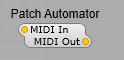
The Patch changes and parameters are handled by the Patch Automator module.
Patch Automator module.
This module remembers the settings of the other controls. Adding this module into a container allows 128 different patches to be stored. Only the settings of the containers sliders or other controls are stored, not the containers structure. If connected to a synth’s MIDI input, it will respond to MIDI patch change messages, and will switch all controls in the same container to the new patch.
The Patch Automator (was Patch Select) module has a hidden connection to each control in the container. Hence you must not connect controls to a Patch-Select’s inputs (doing so would create a feedback loop). For the same reason, you must not connect
sub-controls to the Patch Slelect module.
Stock Modules that support Ignore Program Change;
Containers,
Joystick,
Knob,
LED2,
Mod Wheel,
Peak Meter,
Slider,
Switch,
Text Entry,
VU Meter,
Voltmeter,
Waveshaper2
Waveshaper3
Patch Memories (all),
Any module such as Image 2 that is placed inside a container can be set as IPC, so that your own sub-controls can be made to Ignore Program Changes..
Emulate ‘Ignore Program Change’
This option is shown when exporting your plugin. This feature enables the ‘Ignore Program Change’ feature to work in plugins. (previously, it worked only in the Editor). When you change a preset from the plugin UI, one or more controls will stay unchanged. This is useful for controls like ‘Master Volume’ or ‘Master Tuning’, which you want to apply to all presets.
Note: This feature is activated a couple of seconds after loading a DAW session, so if you change presets immediately, you might not see the effects of Ignore-PC at first.
Note: When you change a preset from the DAW preset browser Ignore-Program-Change is disabled. This is so that when you recall a previously saved session in the DAW, the preset is restored exactly as it was when you saved the session.

IPC in V1.4
In SynthEdit Version 1.4, Ignore Program Change did not work in plugins (or in SynthEdit itself).
IPC In V1.5
“In SynthEdit Version 1.5 we figured out a way to make it work in plugins again, but in order not to break your existing plugins we made it optional.
So if you made a plugin in SE 1.4 IPC didn’t work. With SE 1.5 you have the choice to use IPC, or leave it non-functional for backward compatibility”.