NB. Third Party modules required.
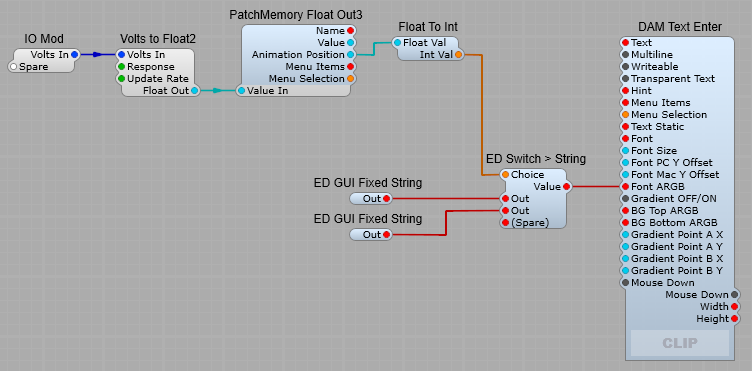
This prefab relies on the ED GUI Fixed String, the ED Switch > String, and the DAM Text Enter modules to provide the colour changing text display.
A simple prefab that changes the colour of the displayed text to red when the audio clipping level is exceeded. This uses one of the lesser known settings on the Volts to Float2 Module. When the Response plug is set to “Clip Detect” a Float output of 10 is output for as long as the input exceeds 10 V. The Update Rate is down to personal choice but I would suggest 60Hz to make sure most of the peaks in the audio likely to cause clipping are detected. The Float Out from the Volts to Float module is converted to GUI Float by the Patch Memory Float Out3, and the Animation Position output is fed to a Float to Integer conversion module. When the input clip level is exceeded the Float value is converted to the Integer 1, which switches from the first ED GUI Fixed string with the value of 55550000 (partially transparent dark red) to the second ED GUI Fixed string with the value of FFFF0000 (opaque bright dark red). The BG Top, and BG Bottom ARGB are set to a partially transparent white background.
The indicator in it’s clipping (left) and non-clipping states.
Fonts can be changed in the DAM module (with the normal warnings about using non-system fonts) along with the Font weight and size. As previously mentioned the colours are set in the ED GUI Fixed String modules.

Leave a Reply